
Security monitoring for SMEs, installed on your premises
Know what is happening on your network.
AI sorts the alerts on your machine; the administrator you appoint decides.
Become a pilot company See how it worksExample: a demo day
Watch the demo (49 s)Timeline of the last 24 hours, from 08:00 the previous day to 07:00, counted on the product's dashboard: 50 alerts, one dot each, of which 17 critical, 20 high, 6 medium and 7 low. They cluster between 14:00 and 18:00, then between 21:00 and 23:00.
- Critical 17
- High 20
- Medium 6
- Low 7
The triage, on the same dashboard:
- 45 to handle
- 17 critical
- 11 AI proposals
- 5 already checked by you
Five critical cases from the night:
21:43, see this critical case 23:32, see this critical case 00:20, see this critical case 02:45, see this critical case 07:35, see this critical caseWhat ANSSI and Cybermalveillance.gouv.fr say
Two public figures, drawn in dots like the timeline.
48%
of the 128 ransomware compromises reported to ANSSI, the French national cybersecurity agency, in 2025 hit micro-enterprises, SMEs or mid-caps (37% in 2024).
One dot per 1% of compromises.
+73%
in requests for assistance to Cybermalveillance.gouv.fr from businesses and non-profits in 2025.
The 100 grey dots stand for 2024; the 73 navy dots are the 2025 increase.
Sources: ANSSI, Panorama de la cybermenace 2025, p. 10 (PDF, in French) · Cybermalveillance.gouv.fr, rapport d'activité 2025, p. 32 (PDF, in French).
In brief
Security monitoring for SMEs, without a team to hire.
-
1
Kyberen reads your logs
Servers, workstations and network. Significant events become clear cases.
-
2
The AI sorts and proposes
A verdict for each case, with its level of certainty. The least certain come first. False positive: an alert with no real danger.
-
3
Your administrator decides
The decision rests with the administrator you appoint, or with the people they give that right to. The AI learns from their corrections and never closes a critical or high case on its own.
Examples taken from the product's demo data.
Works with
- Installs on Windows 10, 11 and Server 2019+
- Windows and Sysmon logs
- Microsoft 365 and Entra ID exports
- Logs from Linux, through a relay: syslog, journald, auditd
- SigmaHQ rules
- MITRE ATT&CK
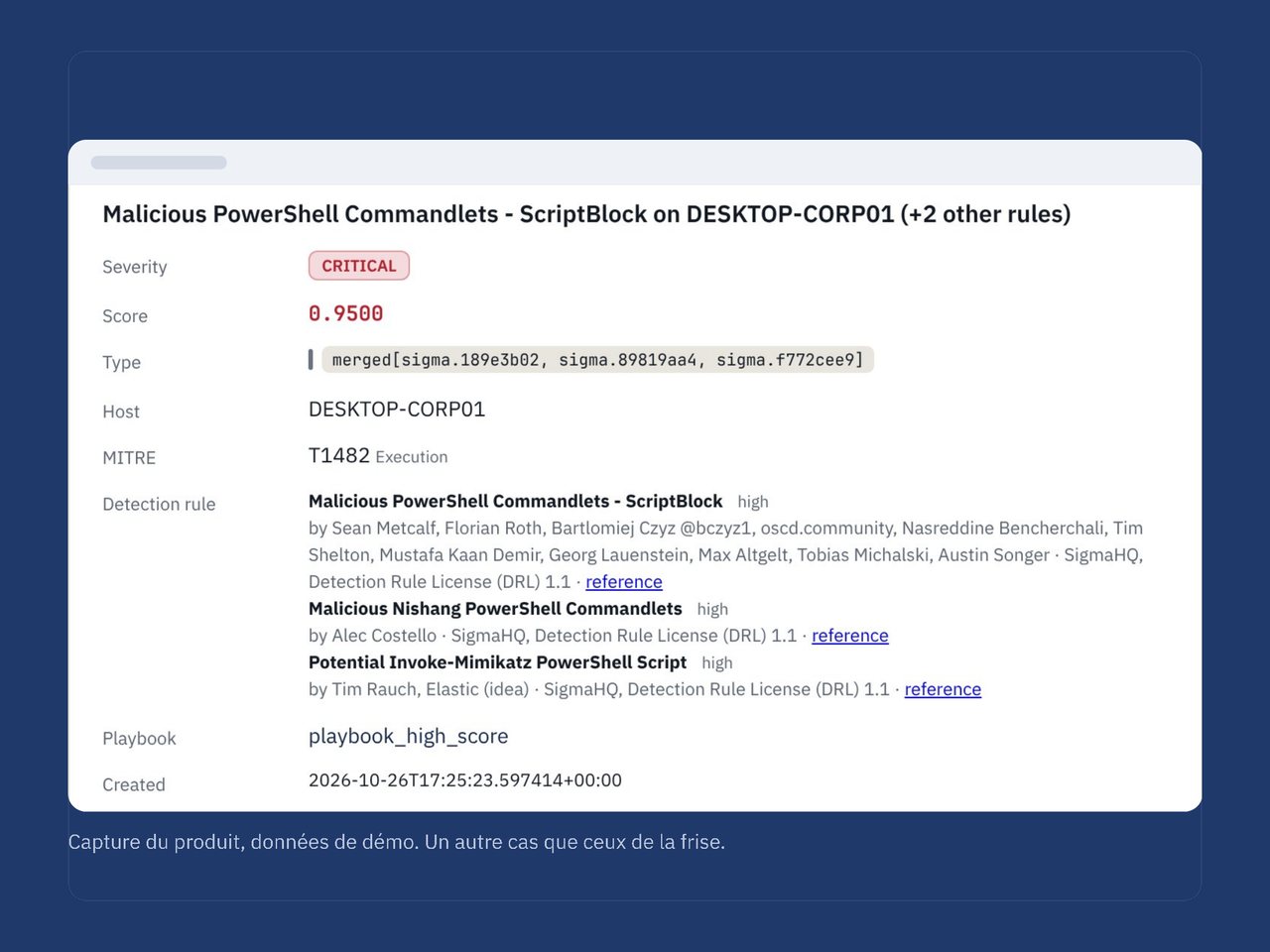
How it works · 7 steps
Follow an alert from start to finish, see the seven steps
From a dot on the timeline to the case, from the original log to the human decision. Then the five critical cases from the night, and the demo in 49 seconds.
Questions before applying
Who watches the alerts at night?
Your administrator, not Kyberen. Nobody at Kyberen has access to your logs. Kyberen sorts the alerts and can notify you by e-mail, but it is not a 24/7 monitoring service.
How much time will it take my administrator?
Our estimate: 15 to 30 minutes a day once the noise is tuned, more in the first month. The pilot is also there to measure it at your company. The least certain cases come first, and critical cases arrive by e-mail if you turn this on.
I already have antivirus. What is Kyberen for?
Antivirus protects each workstation, one at a time. Kyberen reads the logs of your whole fleet, Microsoft Defender's included, along with the servers, the Microsoft 365 exports and the network, and connects what a single workstation cannot see. It does not replace antivirus.
What is the AI?
A triage program that runs on your machine. It is not an online service: nothing is sent to an AI provider.
Where is my data?
On your premises. Kyberen installs on your own machine and the AI runs on it: no log leaves it. The only things that go out are the alerts you turn on (case title, machine, link) and, once a week, the version number check.
What leaves my network?
No logs, and no data sent to Kyberen. Only two things: alerts by e-mail or by message to your chat tool (webhook), if you turn them on (severity, case title, machine name, identifier and link, never the raw logs); and once a week, a check of the latest version number, which sends nothing about your fleet. No usage metrics, no online AI.
Who decides, and can the AI close a serious case?
The administrator you appoint. They create one account per person and choose who can give a verdict (operator role) or approve the AI's proposals (manager role). They set what the AI may do on its own and can switch it back to supervised mode in one click. The AI never closes a critical or high case on its own: a fixed rule that no setting can lift.
I am an SME's IT service provider. Can I apply on its behalf?
Yes, with its agreement: say so in the application. The administrator the company appoints can be its provider. One installation per company: Kyberen has no multi-client mode today.
Which systems does it run on?
Released for Windows 10, 11 and Windows Server 2019 or later, 64-bit. Linux and macOS: not released yet. Installed on Windows, Kyberen also reads the Linux logs (syslog, journald, auditd) that a relay, rsyslog for example, drops into its intake folder.
What do I need to install it?
4 GB of free RAM, 5 GB of disk space, an administrator account, and a second disk, a USB drive or a network share for backups. About 30 minutes. One installation per company; the other Windows machines send it their logs with the forwarding feature built into Windows (Windows Event Forwarding). Full requirements
What language is the interface in?
English, today.
What if I stop?
Your logs and cases are already with you, on your machine, in JSON files that other tools can read (if you do not turn on encryption at rest), with a verified daily backup. An export in the industry-standard format (OCSF) is planned. To uninstall: close Kyberen and delete its folder; it creates no service and no scheduled task. The details
What if Kyberen stops?
Your installation keeps running: the licence is checked on your machine, with no connection to Kyberen. It works until the end of its licence, valid for one year, plus 14 more days. After that it switches to read-only: your data stays viewable, nothing is deleted.
Five pilot companies wanted
For companies with 50 to 250 employees, or with a turnover of €10 million or more, that fall within the scope of the NIS2 directive: food processing and pharmaceuticals first. You need Windows workstations or servers; no dedicated security team is required. Not yet for managing several clients from a single installation.
- Pilot pricing
- Reduced for 24 months, set in the contract
- The framework
- A pilot contract, signed once Kyberen has been incorporated
- In return
- A 30-minute check-in each month, and your feedback as you go
- The commitment
- Set in the same contract; applying commits you to nothing
On your side: a 64-bit Windows machine with 4 GB of free memory and 5 GB of disk space, administrator access, a backup medium (second disk, USB drive or network share), about 30 minutes of installation. Full requirements
Pre-commercial version, interface in English today.
What you get
- A remotely assisted installation, on your machine: your logs stay with you
- A direct line to the founder
- Your needs shape the roadmap
or write to contact@kyberen.com
Please include: your name and role, the company and its headcount, the number of Windows machines, your current security tool, and whether you are its IT service provider.
The technical datasheet, to pass on to your IT provider.
Your message goes straight to the founder and is used only to reply to you (personal data, in French).
After you apply:
- a reply within 48 hours;
- a 30-minute call about your IT fleet and your needs;
- the remotely assisted installation, once the pilot contract is signed.

Damien DeferFounderWho is building KyberenLinkedIn